[2019/06/25 by TS]
|
Access
|
| Important commands to use pyraf | ||
| $ conda activate iraf27 | ||
| $ ds9 & | ||
| $ pyraf #pyrafの起動 | ||
| --> display dev$pix 1 ==> ○Display on ds9 OK!!! But Headers are NG. --> !xpaset -p ds9 fits /mnt/diskB/00SiteSurveyData/00SiteSurveyData/000_A40M_Images_Analysed/03_Ali/2013/201301/20130101A/20130101AWMMs/CM2_Gar20130101235824CWMMs.fits ==> ○Display on ds9 OK!!! and ○Headers are also OK. --> import pyds9 --> d = pyds9.DS9() --> d.set("file /mnt/diskB/00SiteSurveyData/00SiteSurveyData/000_A40M_Images_Analysed/03_Ali/2013/201301/20130101A/20130101AWMMs/CM2_Gar20130101235824CWMMs.fits") ==> ○Display on ds9 OK!!! and ○Headers are also OK. |
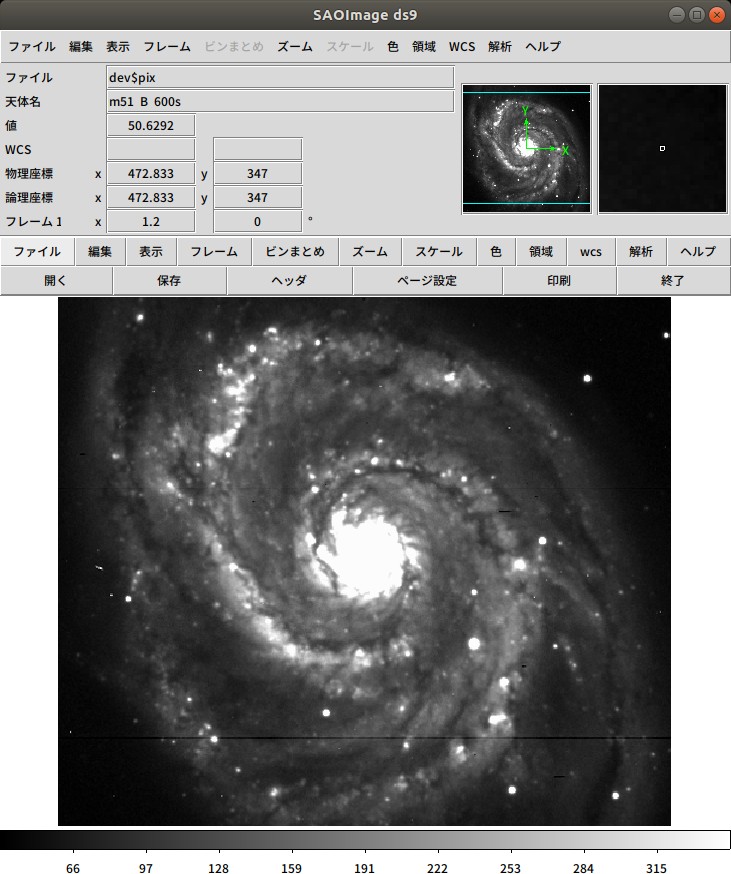
| |
| --> surface dev$pix |
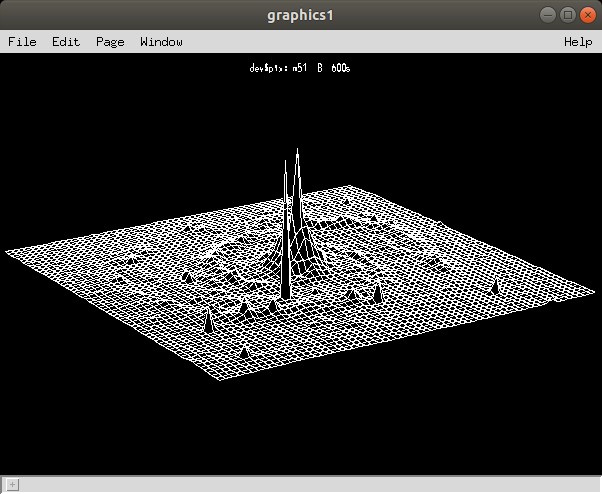
| |
| --> .exit # pyrafはirafと違ってlogoutで終了できない | ||
| IRAFに関する問題点 | ||
| --> display file.fits 1 | ds9 に画像表示はできるが、ds9 での header 表示はファイルヘッダーが読み込まれていない。 | |
|
解決策: (1) 通常の IRAF を起動して、 ecl> !xpaset -p ds9 fits file.fits によって、表示、ヘッダー共にOK. 解決策: (2) # apt install xpa-tools によって、xpaget, xpaset をインストールする。 --> !xpaset -p ds9 fits file.fits によって、表示、ヘッダー共にOK. 解決策: (3) pyds9 をインストールし、 --> d.set("file file.fits") によって、表示、ヘッダー共にOK. |
IRAF インスト-ルは、 IRAF GitHub Install 参照。 pyds9 インスト-ルは、下記参照 | |
| インストール方法変更の背景 |
| 参照 [https://sites.google.com/view/yas-nakajima/IRAF] |
|
2018年にIRAFの配布方法が大幅に変わりました。
NOAOはIRAFのサポートを終了し、http://iraf.noao.eduから
iraf.lnux.x86_64.tar.gzなどのファイルをダウンロードすることができなくなりました。 今後は有志によってIRAFのメンテナンスが行われるとのこと。 現状ではIRAFをダウンロード・インストールするには2通りあります。
... IRAFは2013年以降メンテナンスされていませんでした。そのため、IRAFにはバグや セキュリティ上の問題点も存在しており、NOAOとしても無責任に配布し続けるわけには いかなかったのでしょう。[ 2019-03-22 ] 原文の下記ウエブを参照してください。 http://ast.noao.edu/data/software IRAF - Image Reduction and Analysis Facility NOAO is transitioning IRAF to an end-of-support state, and has taken NOAO's IRAF distribution offline pending a final copyright and licensing review of the source code. Users interested in new IRAF installations during this review period may wish to consider the following two distributions: [Last updated or reviewed March 1, 2019.]
|
AstroConda を用いてのインスト-ルは、下記ウエブに記載されています。
|
はじめに、Anaconda/Minicondaの違いは、
インストールされるパッケージの違いです。
Minicondaは、「Python+conda+最小限のパッケージ」でAnacondaの最小構成版です。 pythonのインストールは簡単に行えますが、必要なパッケージや実行環境の構築は condaを使用して個別に行う必要があります。 Anaconda/Minicondaのメリット・デメリットは、このウエブを参照してください。
ちなみにファイルサイズは2018年10月に試した時点で、10倍以上の差があります。
| |||||||||||||||||||||||||||||||||
   # source ~/.bashrc
   # >>> conda initialize >>>
   # !! Contents within this block are managed by 'conda init' !!
   __conda_setup="$('/home/sasaki/IRAF/miniconda2/bin/conda' 'shell.bash' 'hook' 2> /dev/null)"
   if [ $? -eq 0 ]; then
      eval "$__conda_setup"
   else
      if [ -f "/home/sasaki/IRAF/miniconda2/etc/profile.d/conda.sh" ]; then
          . "/home/sasaki/IRAF/miniconda2/etc/profile.d/conda.sh"
      else
          export PATH="/home/sasaki/IRAF/miniconda2/bin:$PATH"
      fi
   fi
   unset __conda_setup
   # <<< conda initialize <<<

   export PYENV_ROOT="$HOME/.pyenv"
   export PATH="$PYENV_ROOT/bin:$PATH"
   eval "$(pyenv init -)"

   # Add iraf setup commands
   if [ -e /home/sasaki/.iraf/setup.sh ]; then
      source /home/sasaki/.iraf/setup.sh
   fi
現在の仮想環境のパッケージを確認
Collecting package metadata: done Solving environment: done ## Package Plan ## environment location: /home/sasaki/miniconda2/envs/iraf27 added / updated specs: - iraf-all - pyraf-all - python=2.7 - stsci The following packages will be downloaded: package | build ---------------------------|----------------- acstools-2.1.0 | py27_0 65 KB http://ssb.stsci.edu/astroconda asdf-1.3.3 | py27_3 445 KB http://ssb.stsci.edu/astroconda ... iraf-2.16.UR.1 | 0 185.1 MB http://ssb.stsci.edu/astroconda iraf-all-1.0 | 1 5 KB http://ssb.stsci.edu/astroconda ... stsci-3.1.0 | py27_0 2 KB http://ssb.stsci.edu/astroconda stsci-data-analysis-2.2.0 | py27_0 2 KB http://ssb.stsci.edu/astroconda ... The following NEW packages will be INSTALLED: acstools astroconda/linux-64::acstools-2.1.0-py27_0 asdf astroconda/linux-64::asdf-1.3.3-py27_3 ... Proceed ([y]/n)? y Downloading and Extracting Packages traitlets-4.3.2 | 128 KB | ##################################### | 100% pexpect-4.7.0 | 80 KB | ##################################### | 100% ... Preparing transaction: done Verifying transaction: done Executing transaction: done # # To activate this environment, use # # $ conda activate astroconda # # To deactivate an active environment, use # # $ conda deactivate |
| pyds9 のインストール |
      pipはPythonのパッケージを管理するためのツールのインストール
   # curl https://bootstrap.pypa.io/get-pip.py -o get-pip.py
   # python  get-pip.py
         DEPRECATION: Python 2.7 will reach the end of its life on January 1st, 2020. Please upgrade your Python as Python 2.7 won't be maintained after that date. A future version of pip will drop support for Python 2.7. More details about Python 2 support in pip, can be found at https://pip.pypa.io/en/latest/development/release-process/#python-2-support
         WARNING: The directory '/home/sasaki/.cache/pip/http' or its parent directory is not owned by the current user and the cache has been disabled. Please check the permissions and owner of that directory. If executing pip with sudo, you may want sudo's -H flag.
         WARNING: The directory '/home/sasaki/.cache/pip' or its parent directory is not owned by the current user and caching wheels has been disabled. check the permissions and owner of that directory. If executing pip with sudo, you may want sudo's -H flag.
         Collecting pip
         Downloading https://files.pythonhosted.org/packages/30/db/9e38760b32e3e7f40cce46dd5fb107b8c73840df38f0046d8e6514e675a1/pip-19.2.3-py2.py3-none-any.whl (1.4MB)
         |????????????????????????????????| 1.4MB 9.7MB/s
         Collecting setuptools
         Downloading https://files.pythonhosted.org/packages/b2/86/095d2f7829badc207c893dd4ac767e871f6cd547145df797ea26baea4e2e/setuptools-41.2.0-py2.py3-none-any.whl (576kB)
         |????????????????????????????????| 583kB 57.8MB/s
         Collecting wheel
         Downloading https://files.pythonhosted.org/packages/00/83/b4a77d044e78ad1a45610eb88f745be2fd2c6d658f9798a15e384b7d57c9/wheel-0.33.6-py2.py3-none-any.whl
         Installing collected packages: pip, setuptools, wheel
         Successfully installed pip-19.2.3 setuptools-41.2.0 wheel-0.33.6

   $ sudo pip install --upgrade pyds9
         DEPRECATION: Python 2.7 will reach the end of its life on January 1st, 2020. Please upgrade your Python as Python 2.7 won't be maintained after that date. A future version of pip will drop support for Python 2.7. More details about Python 2 support in pip, can be found at https://pip.pypa.io/en/latest/development/release-process/#python-2-support
         WARNING: The directory '/home/sasaki/.cache/pip/http' or its parent directory is not owned by the current user and the cache has been disabled. Please check the permissions and owner of that directory. If executing pip with sudo, you may want sudo's -H flag.
         WARNING: The directory '/home/sasaki/.cache/pip' or its parent directory is not owned by the current user and caching wheels has been disabled. check the permissions and owner of that directory. If executing pip with sudo, you may want sudo's -H flag.
         Collecting pyds9
         Downloading https://files.pythonhosted.org/packages/c2/cb/b9a20a6479a44eb9bbc2cb313469feed3da94707f325195dee2d6ca491bd/pyds9-1.8.1.tar.gz (888kB)
         |????????????????????????????????| 890kB 7.7MB/s
         Collecting six (from pyds9)
         Downloading https://files.pythonhosted.org/packages/73/fb/00a976f728d0d1fecfe898238ce23f502a721c0ac0ecfedb80e0d88c64e9/six-1.12.0-py2.py3-none-any.whl
         Building wheels for collected packages: pyds9
         Building wheel for pyds9 (setup.py) ... done
         Created wheel for pyds9: filename=pyds9-1.8.1-cp27-none-any.whl size=406996 sha256=a7b6c34b4e2a944b47cad7baa268239e107c8f47f977021237a16e98ba8b8f7e
         Stored in directory: /home/sasaki/.cache/pip/wheels/a0/d0/57/5ef227fa017abeef368e24c42131cdde45cb10b4fa41f03dac
         Successfully built pyds9
         Installing collected packages: six, pyds9
         Successfully installed pyds9-1.8.1 six-1.12.0

   $ python
      ... (startup messages) ...
      >>>  import pyds9

	    An instance of ds9 was found to be running before we could
	    start the 'xpans' name server. You will need to perform a
	    bit of manual intervention in order to connect this
	    existing ds9 to Python.

	    For ds9 version 5.7 and beyond, simply register the
	    existing ds9 with the xpans name server by selecting the
	    ds9 File->XPA->Connect menu option. Your ds9 will now be
            fully accessible to pyds9 (e.g., it appear in the list
            returned by the ds9_targets() routine).

            For ds9 versions prior to 5.7, you cannot (easily) register
            with xpans, but you can view ds9's File->XPA Information
            menu option and pass the value associated with XPA_METHOD
            directly to the Python DS9() constructor, e.g.:

               d = DS9('a000101:12345')

            The good news is that new instances of ds9 will be
            registered with xpans, and will be known to ds9_targets()
            and the DS9() constructor.


    $ /usr/local/lib/python2.7/dist-packages/xpans
    $ xpaset
         Command 'xpaset' not found, but can be installed with:
         sudo apt install xpa-tools
    # apt install xpa-tools
      以下のパッケージが新たにインストールされます:
         libxpa1 xpa-tools
    $ whereis xpaset
      xpaset: /usr/bin/xpaset /usr/share/man/man1/xpaset.1.gz
|
    $ pyraf
    --> import pyds9
    --> d = pyds9.DS9()    # will open a new ds9 window or connect to an existing one
                             # with -xpa connect (as default)
    --> print(pyds9.ds9_targets()) 	 # for checking the ds9 connection
         ['DS9:ds9 7f000001:39439']
    -->  d.set("file /mnt/diskB/00SiteSurveyData/00SiteSurveyData/000_A40M_Images_Analysed/03_Ali/2013/201301/20130101A/20130101AWMMs/CM2_Gar20130101235824CWMMs.fits")
           ==> ○Display on ds9 OK!!! and ○Headers are also OK.
    --> display /mnt/diskB/00SiteSurveyData/00SiteSurveyData/000_A40M_Images_Analysed/03_Ali/2013/201301/20130101A/20130101AWMMs/CM2_Gar20130101235824CWMMs.fits 2
        z1=0. z2=300000.
        ==> ○Display on ds9 OK!!! and ▲Headers are NG!!!
      -->  !xpaset -p ds9 fits /mnt/diskB/00SiteSurveyData/00SiteSurveyData/000_A40M_Images_Analysed/03_Ali/2013/201301/20130101A/20130101AWMMs/CM2_Gar20130101235824CWMMs.fits
        ==> ○Display on ds9 OK!!! and ○Headers are also OK.

    [ some other commands on pyds9]
    --> !ds9 &
    --> !/home/sasaki/0Downloads/ds9 &

    --> d.get('frame')
    '1'
    --> d.set("frame new")
    --> d.set("frame delete")
    --> d.set("frame delete all")
    --> d.set("frame new")

    --> d.get("frame frameno")
    '2'
    --> d.set("frame frameno 3")
    --> d.get("frame frameno")
    '3'
    --> d.get("frame all")
    '1 2 4 3'
    --> d.set("header")
         ==> appears sub-winows
    --> d.set("header close")

    --> d.set("zoom to fit")
    --> .exit
|
Created directory /home/sasaki/IRAF/iraf/pyraf for cache
setting terminal type to xterm...
ERROR: ld.so: object 'libesets_pac.so' from /etc/ld.so.preload cannot be preloaded (wrong ELF class: ELFCLASS64): ignored.
NOAO/IRAF PC-IRAF Revision 2.16 EXPORT Thu May 24 15:41:17 MST 2012
This is the EXPORT version of IRAF V2.16 supporting PC systems.
Welcome to IRAF. To list the available commands, type ? or ??. To get
detailed information about a command, type `help
|
| [ $ cd ~/IRAF/iraf ] [ $ pyiraf ] |
iraf27 の実行 (すでに上記で実行しました) | |
| --> display dev$pix 1 ==> ○Display on ds9 OK!!! But Headers are NG. --> !xpaset -p ds9 fits /mnt/diskB/00SiteSurveyData/00SiteSurveyData/000_A40M_Images_Analysed/03_Ali/2013/201301/20130101A/20130101AWMMs/CM2_Gar20130101235824CWMMs.fits ==> ○Display on ds9 OK!!! and ○Headers are also OK. --> import pyds9 --> d = pyds9.DS9() --> d.set("file /mnt/diskB/00SiteSurveyData/00SiteSurveyData/000_A40M_Images_Analysed/03_Ali/2013/201301/20130101A/20130101AWMMs/CM2_Gar20130101235824CWMMs.fits") ==> ○Display on ds9 OK!!! and ○Headers are also OK. |
#pyrafでdisplayが動くかの確認 |
|
| --> surface dev$pix Image will be block averaged by 8 in x and 8 in y |
#pyrafでsurfaceが動くかの確認 |
|
--> logout
| ||
| $ .exit | # pyrafはirafと違ってlogoutで終了できない。 | |
| IRAF/Pyraf commands |
| # conda environments: |
   base          /home/sasaki/IRAF/miniconda2
   iraf27     *  /home/sasaki/IRAF/miniconda2/envs/iraf27
                 /home/sasaki/IRAF/miniconda3
                 /home/sasaki/IRAF/miniconda3/envs/iraf27
|
| $ source ~/.bashrc |
| $ conda activate iraf27 |
| $ pyraf |
| --> ! ds9 & |
| --> cd /mnt/diskB/00SiteSurveyData/00SiteSurveyData/000_A40M_Images_Analysed/03_Ali/2011/201111/20111130A |
| --> imstat dev$pix |
| --> imstat CM2_Ali20111130000004CWMs.fits |
| --> epar imstat |
| --> |
| --> |
| IRAF Commands |
  $ ls ~/IRAF/miniconda2/envs/iraf27/
  drwxr-xr-x  2 sasaki sasaki 20480  6月 23 11:02 bin
  drwxr-xr-x  2 sasaki sasaki  4096  6月 23 11:00 compiler_compat
  drwxr-xr-x  2 sasaki sasaki 20480  6月 23 11:02 conda-meta
  drwxr-xr-x  3 sasaki sasaki  4096  6月 23 11:00 doc
  drwxr-xr-x  6 sasaki sasaki  4096  6月 23 11:01 etc
  -rw-r--r--  1 sasaki sasaki  7072  6月 23 11:02 extern.pkg
  -rw-r--r--  1 sasaki sasaki  6965  6月 23 11:02 extern.pkg.ac_bak
  drwxr-xr-x 24 sasaki sasaki 12288  6月 23 11:00 include
  drwxr-xr-x 18 sasaki sasaki  4096  6月 23 10:59 iraf
	drwxr-xr-x  4 sasaki sasaki   4096  6月 23 10:58 doc/
	drwxr-xr-x 14 sasaki sasaki   4096  6月 23 10:58 math/
        drwxr-xr-x 20 sasaki sasaki   4096  6月 23 10:58 noao/
        drwxr-xr-x 19 sasaki sasaki   4096  6月 23 10:59 pkg/
        drwxr-xr-x 27 sasaki sasaki   4096  6月 23 10:59 sys/
        drwxr-xr-x 27 sasaki sasaki   4096  6月 23 10:59 unix/
        drwxr-xr-x  2 sasaki sasaki   4096  6月 23 10:59 ur/
        drwxr-xr-x  2 sasaki sasaki   4096  6月 23 10:59 util/
        drwxr-xr-x  4 sasaki sasaki   4096  6月 23 10:59 vendor/
        drwxr-xr-x 10 sasaki sasaki   4096  6月 23 10:59 vo/

  drwxr-xr-x 29 sasaki sasaki  4096  6月 23 11:02 iraf_extern
        drwxr-xr-x  6 sasaki sasaki 4096  6月 23 10:59 adccdrom/
        drwxr-xr-x  5 sasaki sasaki 4096  6月 23 11:00 cfh12k/
        drwxr-xr-x  3 sasaki sasaki 4096  6月 23 11:00 cirred/
        drwxr-xr-x 15 sasaki sasaki 4096  6月 23 10:59 ctio/
        drwxr-xr-x  3 sasaki sasaki 4096  6月 23 10:59 cutoutpkg/
        drwxr-xr-x  6 sasaki sasaki 4096  6月 23 10:59 deitab/
        drwxr-xr-x  5 sasaki sasaki 4096  6月 23 11:00 esowfi/
        drwxr-xr-x  6 sasaki sasaki 4096  6月 23 10:59 finder/
        drwxr-xr-x  6 sasaki sasaki 4096  6月 23 10:59 fitsutil/
        drwxr-xr-x 16 sasaki sasaki 4096  6月 23 11:00 gemini/
        drwxr-xr-x  5 sasaki sasaki 4096  6月 23 10:59 gmisc/
        drwxr-xr-x 11 sasaki sasaki 4096  6月 23 10:59 guiapps/
        drwxr-xr-x  3 sasaki sasaki 4096  6月 23 11:02 kepler/
        drwxr-xr-x  5 sasaki sasaki 4096  6月 23 10:59 mem0/
        drwxr-xr-x  4 sasaki sasaki 4096  6月 23 10:59 mscdb/
        drwxr-xr-x  6 sasaki sasaki 4096  6月 23 10:59 mscred/
        drwxr-xr-x 10 sasaki sasaki 4096  6月 23 10:59 mtools/
        drwxr-xr-x 12 sasaki sasaki 4096  6月 23 10:59 nfextern/
        drwxr-xr-x 15 sasaki sasaki 4096  6月 23 10:59 rvsao/
        drwxr-xr-x  5 sasaki sasaki 4096  6月 23 10:59 sqiid/
        drwxr-xr-x  8 sasaki sasaki 4096  6月 23 11:00 stecf/
        drwxr-xr-x  9 sasaki sasaki 4096  6月 23 11:00 stsdas/
        drwxr-xr-x  6 sasaki sasaki 4096  6月 23 10:59 tables/
        drwxr-xr-x  6 sasaki sasaki 4096  6月 23 11:00 ucsclris/
        drwxr-xr-x  3 sasaki sasaki 4096  6月 23 10:59 upsqiid/
        drwxr-xr-x  7 sasaki sasaki 4096  6月 23 10:59 xdimsum/
        drwxr-xr-x 17 sasaki sasaki 4096  6月 23 11:00 xray/

  drwxr-xr-x 21 sasaki sasaki 36864  6月 23 11:01 lib
  drwxr-xr-x  2 sasaki sasaki  4096  6月 23 10:58 lib32
  drwxr-xr-x  3 sasaki sasaki  4096  6月 23 11:00 libexec
  drwxr-xr-x 65 sasaki sasaki  4096  6月 23 11:00 mkspecs
  drwxr-xr-x  2 sasaki sasaki  4096  6月 23 11:00 phrasebooks
  drwxr-xr-x 27 sasaki sasaki  4096  6月 23 11:00 plugins
  drwxr-xr-x 25 sasaki sasaki  4096  6月 23 11:00 qml
  drwxr-xr-x  2 sasaki sasaki  4096  6月 23 11:00 resources
  drwxr-xr-x 21 sasaki sasaki  4096  6月 23 11:01 share
  drwxr-xr-x  3 sasaki sasaki  4096  6月 23 10:59 ssl
  drwxr-xr-x  3 sasaki sasaki 12288  6月 23 11:00 translations
  drwxr-xr-x  3 sasaki sasaki  4096  6月 23 11:00 var
  drwxr-xr-x  3 sasaki sasaki  4096  6月 23 10:58 x86_64-conda_cos6-linux-gnu
|
Modules: os pyraf shutil sys makeIrafPar : function makeIrafPar(init_value, datatype=None, name=' |
| $ pyraf |
   --> help images
   clpackage.images:
       imcoords - Image coordinates package
       imfilter - Image filtering package
          imfit - Image fitting package
         imgeom - Image geometric transformation package
        immatch - Image matching and combining package
         imutil - Image utilities package
             tv - Image display utilities package

   --> help list

	  LISTSPEC (Apr2008)                rvsao               LISTSPEC (Apr2008)

NAME
    listspec -- List wavelength and pixel value for spectrum image

USAGE
    listspec filelist

PARAMETERS
    input
        Image file template.

    specext = 0
        Spectrum extension number in multiextension FITS image
    ...
|
| http://www.stsci.edu/institute/software_hardware/pyraf/pyraf_faq [ PyRAF FAQ [Last edited: 6 Jan 2017.] |
| --> epar [task] |
| --> setinstrument [task] |
| --> .exit |
| IRAF/Pyraf コマンドの詳細 |
   #入力ファイルリスト書き出し
   --> ls CM2_Gar20130101[0-2][0-9][0-5][0-9][[0-5][0-9]CWMMs.fits > CM2_Gar_raw.list
   --> ls CM2_Gar20130102[0-2][0-9][0-5][0-9][[0-5][0-9]CWMMs.fits >> CM2_Gar_raw.list
   --> ls CM2_Gar201301[0-3][0-9][0-2][0-9][0-5][0-9][[0-5][0-9]CWMMs.fits >> CM2_Gar_raw.list

   #出力ファイルリスト書き出し
   sed -e s/.fits/-real.fits/ kls-raw.list > kls-real.list

   #IRAFは基本的にfitsファイルを上書きしない設定になっているので、既存ファイルを事前に削除しておく
   awk '{print "rm -f " $1}' kls-real.list | sh
   chpixtype @kls-raw.list @kls-real.list real
|
|
toTibetDataAnalysis
|
toPageTop
|
toToshi
|
Back to SasakiFamily's Page
|
 Toshi Sasaki's HOME Page on sasakihome.info