|
install IRAF
|
Karasu List
|
Oma List
|
Ali List
|
toPageBottom
|
Back to IRAF Analysis Page
|
Back to TibetSiteSurvey Page
|
Back to ToshiSasaki's Page
|
| CloudMon.exe detailed Info |
[2019/07/04 by TS]
|
Access
|
| CloudMon.exe on Microsoft Windows | |
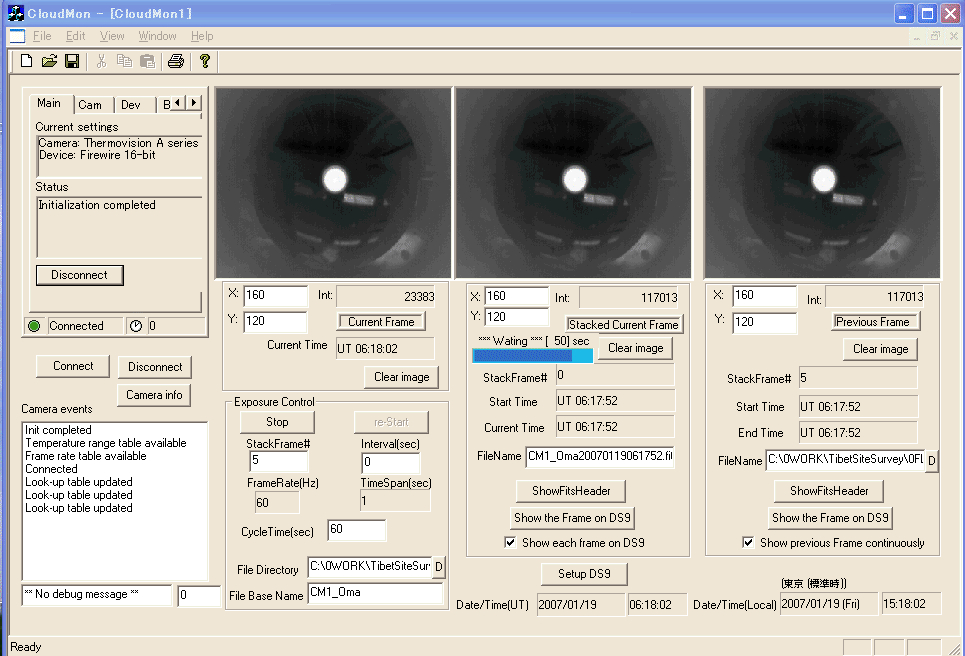
| GUI of CloudMon.exe Q:\1ToshiPrivate\0Tos_Soft\0WindowsSoft\0MonitorImages\CloudMon20111006_2.jpg |
|
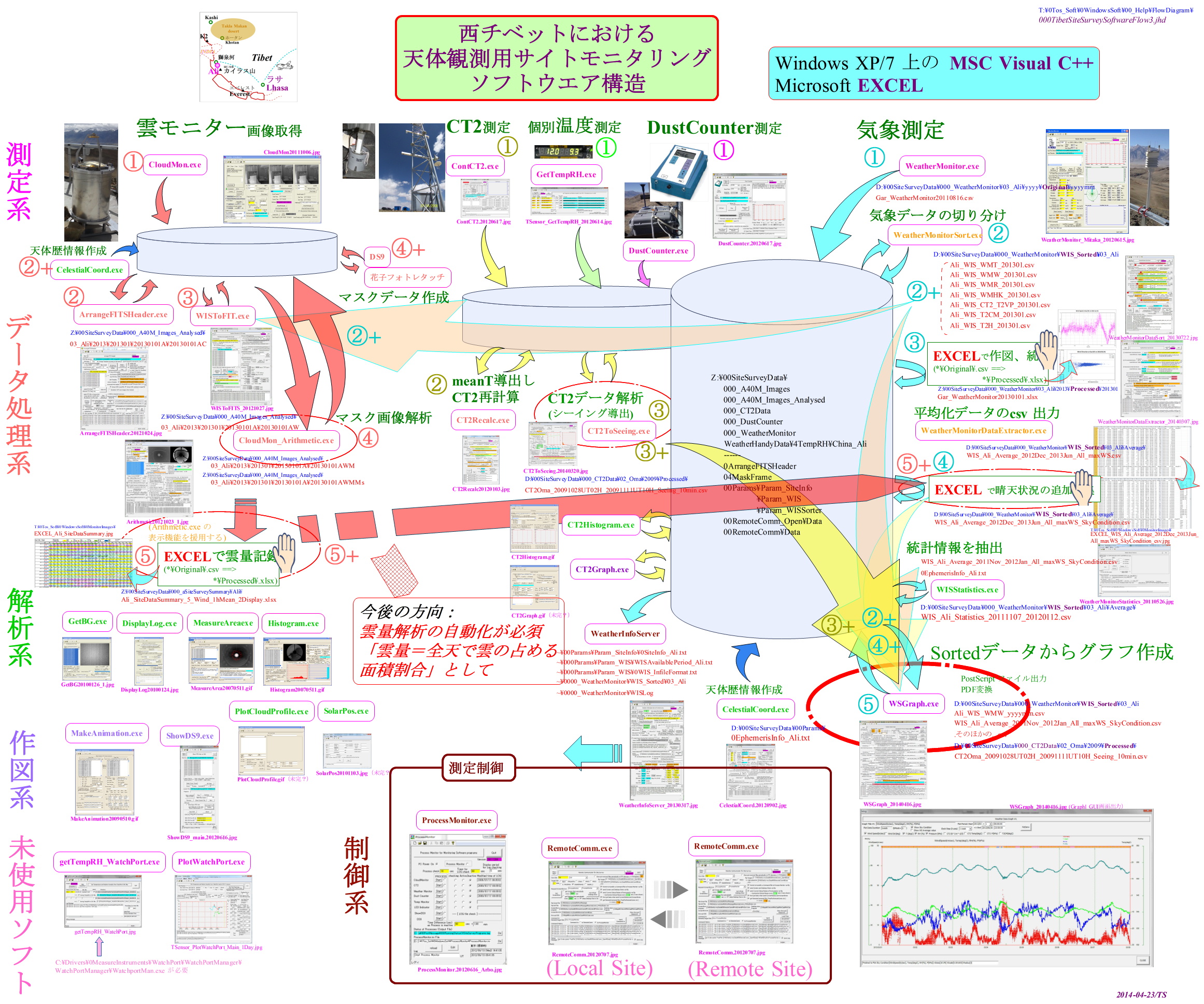
| (ref) Analysis Flow Chart on Site Survey Data Q:\1ToshiPrivate\0Tos_Soft\0WindowsSoft\00_Help\FlowDiagram\Q:\1ToshiPrivate\0Tos_Soft\0WindowsSoft\00_Help\FlowDiagram.jpg |
|
| Initial Data for CloudMon.exe Q:\1ToshiPrivate\0Tos_Soft\0WindowsSoft\CloudMon\CloudMon.ini | |
[CloudMon] sCloudMon_Version=20120626 FileBaseName=CM2_Ali sFITSHeader_Template=C:\0Tos_Soft\0WindowsSoft\CloudMon\FitsHeader.txt FrameDirectory=C:\00SiteSurveyData\000_A40M_Images\03_Ali\20120617 PostFileDirectory=C:\00SiteSurveyData\00PostMessage Image3_Filename=C:\00SiteSurveyData\000_A40M_Images\03_Ali\20110127\CM2_Ali20110127113400.fits StackFrame=15 IntervalTime=0 CycleTime=10 ShowEachFrameOnDS9=0 AtHome=home bAutoFocus=1 sFocusTimeSpan=2 AutoCalibration=1 sCalibrationPeriod=60 InitialRebootPeriod=1 sCloudMonStatus=running bInitialReboot=0 bRebootSameMinMax=1 DS9_Directory=C:\Appli\1Viewer\FitsViewer\ds9 sDS9XPAID=c0a801f7:1073 DS9_Tile1=CM2_Ali DS9_Tile2=Cloud StackFrame=15 | |
| Explanation on CloudMon.exe Q:\1ToshiPrivate\0Tos_Soft\0WindowsSoft\00_Help\HELP_CloudMonitor.txt | |
	  2012-06-13/TS

CloudMonitor 取り扱い
	  中間赤外線カメラ FLIR A40M を検出器として用いた全天雲モニタの画像をFirewire400 経由で取得し、
	  GUI表示、画像データの加算平均処理、平均化画像のfits 変換、平均化画像fits画像データのファイル出力、を行う。
	  外部とファイル渡しで制御コマンド受信、実行、ログ出力を行う。
GUI表示画像は、3画像あり、
	(左画像)取得直後の生画像(stackしていない)もの、
	(中画像)stack中の画像、
	(右画像)保存された直前のデータ
        が表示される。
default 設定値は、
	AutoFocus = 2 hous
	AutoCalibration = 60 min
	Interval = 0 sec (取得生画像間の時間間隔)
	Stack frame# = 15
		タイマー割り込み(iTimer=200msec)による画像取得トリガーとあわせて <== 500msec でも試している。
		Interval=0 である場合には、
	 		TimeSpan(sec)= (int)((float)iTimer/1000.0 * atof(m_StackFrame)),
		Interval>0 である場合には、
	 		TimeSpan(sec)= atoi(m_IntervalTime) * atoi(m_StackFrame);
		となる。
	FrameRate=60Hz(max) w/A40M(生画像取得時間=16.7msec), =7.5Hz at Home
	EXPTime(sec)= Stack frame# / FrameRate, であるので、60Hz,15 Stack では、0.25秒である。
	CycleTime = 60 sec ( stacked 画像取得時間の間隔 )

PC起動直後は、カメラFLIR A40M の初期化が完了していないので、通信が行えずに制御不能であるので、
PC初期電源投入後にして時間経過後にPC再起動を行う設定がある(□Initial Rebbot after X min)。
	==> ProcessMonitor で実現できるか?(2012-06-13/TS)

画面サンプル:\0Tos_Soft\0WindowsSoft\0MonitorImages\CloudMon_20120618_Mtk2.jpg

初期化ファイル:CloudMon.ini
ログファイル:[%s\\%s] sLogFileDirectory, sLogFilename
通信ファイル:[%s] PostFile
FITSヘッダーのテンプレートファイル:[%s] sFITSHeader_Template
FITSファイル保存ディレクトリ:[%s\\%sYYYYMMDDhhmmss.fits] FrameDirectory, FileBaseName (313,920 bytes)
ヘルプファイル:C:\0Tos_Soft\0WindowsSoft\00_Help\HELP_CloudMonitor.txt

初期化ファイル:CloudMon.ini の内容(2011-12-11)
	[CloudMon]
	sCloudMon_Version=20111210
	sFITSHeader_Template=C:\00SiteSurveyData\00PostMessage\FitsHeader_Hilo.txt
	StackFrame=15
	IntervalTime=0
	CycleTime=60
	FrameDirectory=C:\00SiteSurveyData\000_A40M_Images\04_Hilo\20111211
	FileBaseName=CM2_Hilo
	ShowEachFrameOnDS9=0
	Image3_Filename=C:\00SiteSurveyData\000_A40M_Images\04_Hilo\20111211\CM2_Hilo20111211041822.fits
	AtHome=home
	PostFile=C:\00SiteSurveyData\00PostMessage
	bAutoFocus=1
	sFocusTimeSpan=2
	AutoCalibration=1
	sCalibrationPeriod=60
	InitialRebootPeriod=1
	sCloudMonStatus=running
	bInitialReboot=0
	bRebootSameMinMax=1
	DS9_Directory=C:\Appli\FitsViewer\ds9
	sDS9XPAID=c0a801f7:1073
	DS9_Tile1=CM2_Hilo
	DS9_Tile2=Cloud
	Image3_Filename=C:\00SiteSurveyData\000_A40M_Images\04_Hilo\20110127\CM2_Hilo20110127113400.fits

AtHome=home の場合は、階調表示のダミーデータを生成し、FITSファイルとして処理する。
AtHome=office の場合は、カメラ画像を取得し、FITSファイルとして処理する。

FITSヘッダーのテンプレートファイル:[%s] sFITSHeader_Template
	SIMPLE  =                    T / Fits standard
	BITPIX  =                   32 / No.Bits per pixel
	NAXIS   =                    2 / No.dimensions
	NAXIS1  =                  320 / Length X axis
	NAXIS2  =                  240 / Length Y axis
	ORIGIN  = 'CloudMon -- NAOJ  ' / Origin of FITS image
	DATE    = '11/16/06          ' / Date of FITS file creation
	DATE-OBS= '11/16/05          ' / UT date of Observation
	UTSTART = '06:33:00.00       ' / UT time of observation at start
	UT      = '06:33:00.00       ' / UT time of observation at middle
	UTEND   = '06:33:00.00       ' / UT time of observation at end
	EXPOSURE=  4.0000000000000E+01 / Exposure timesecond ( total exposures )
	NSTACK  =                  100 / Stacked frames
	FRAMERAT=                   60 / Frame rate in Hz
	INTERVAL=                   10 / Stack one frame out of every INTERVAL frames
	DURATION=               1000.0 / Duration Time (Sec): NStack*NInterval*500msec
	CYCLETIM=                  600 / Cycle Time between start and next start (sec)
	BANDPASS= 'Mid-IR            ' / FLIR A40M camera 7.5-13 um
	SITELAT = '+32:19:31.73      ' / Latitude of Observatory at Ali
	SITELONG= '+80:01:36.04      ' / Longitude of Observatory at Ali
	TELESCOP= 'Cloud Monitor#1   ' / Telescope where plate taken
	DATATYPE= 'TLONG             ' / Type of Data
	DATAMAX =                13474 / Maximum data value
	DATAMIN =                  750 / Minimum data value
	OBJECT  = 'Cloud in Z > 70deg' / Object ID
	OBJCTRA = '09 55 52.190      ' / Zenith Right Ascension (J2000)
	OBJCTDEC= '+69 40 48.80      ' / Zenith Declination (J2000)
	EQUINOX = 2000.0               / Julian Reference frame equinox
	CTYPE1  = 'RA---TAN'           / Gnomonic projection
	CRPIX1  = 160                  / Pixel coordinate of reference point
	CD1_1   = 0.5625               / 180deg/320 per pixel
	CTYPE2  = 'DEC--TAN'           / Gnomonic projection
	CRPIX2  = 120                  / Pixel coordinate of reference point
	CD2_2   = 0.5625               / 180deg/320 per pixel
	LONPOLE = 0                    / Native longitude of celestial pole
	RADESYS = 'FK5'                / Mean IAU 1984 equatorial coordinates
	END

天頂の赤経座標OBJCTRA, OBJCTDEC は、FITSファイル保存時に、DATE-OBS, UTとSITELAT, SITELONGから計算されて保存される。
DATAMAX, DATAMIN は取得画像の統計演算で求められる。
CTYPE1からLONPOLEまでは、NEWSをFITS形式で正しく設定するために必要。


制御コマンド:
	quit			// quit CludMonitor process
	exit			// quit CludMonitor process
	stop			// stop getting MIR image
	restart			// restart getting MIR image
	hide CloudMonitor
	show CloudMonitor
	set stack    N (Frame#)
	set interval N (sec)
	set cycle    N   (sec)
	? get cameraInfo  <-- Not confirmed as no camera connected now.
	clear display 1|2|3   <-- NOT reflect to OnDraw()
	show in DS9 current|previous (frame)  <-- NG:current, OK:previous
	set show current in DS9 on|off
	set show previous on|off (in display3)
	set XY in display 1|2|3 xxx yyy (to show intensity)
	set debug ddd
| |
|
install IRAF
|
Karasu List
|
Oma List
|
Ali List
|
toPageTop
|
Back to IRAF Analysis Page
|
Back to TibetSiteSurvey Page
|
toToshi
|
Back to SasakiFamily's Page
|
 Toshi Sasaki's HOME Page on sasakihome.info
 Last Modified:
toshi.sasaki@nao.ac.jp